
What you'll learn: Everything you need to use PERM Tracker effectively — creating cases, tracking deadlines, managing recruitment, handling RFIs and RFEs, configuring notifications, using the calendar, and getting answers from the AI assistant.
Welcome — Who This Is For
PERM Tracker is a free case management tool for anyone involved in the PERM labor certification process:
- Immigration attorneys managing a caseload of PERM cases
- Paralegals tracking deadlines and recruitment activities
- HR professionals sponsoring employees for green cards
- Employers keeping tabs on their own cases
No credit card. No trial period. Free forever.
💡 New to PERM?
If you're unfamiliar with the PERM process, start with our overview of PERM labor certification or the Ultimate PERM Guide first.
Watch the Product Demo
See PERM Tracker in action — this interactive demo walks through the dashboard, case management, deadline tracking, and more.
The PERM Process in 60 Seconds
Every PERM case follows four stages. PERM Tracker tracks them all:
- PWD — File a prevailing wage determination request with the DOL. Receive the determination, which sets the wage and has an expiration date.
- Recruitment — Conduct required recruitment activities: job order, Sunday ads, notice of filing, and (for professional occupations) three additional methods.
- ETA 9089 — File the PERM application after a 30-day quiet period. Wait for certification (or audit/denial).
- I-140 — File the immigrant petition within 180 days of certification.
Each stage has specific deadlines, and missing one can mean starting over. That's what PERM Tracker is for.
Your Dashboard — Command Center
Once signed in, you land on the Dashboard. It shows everything at a glance:
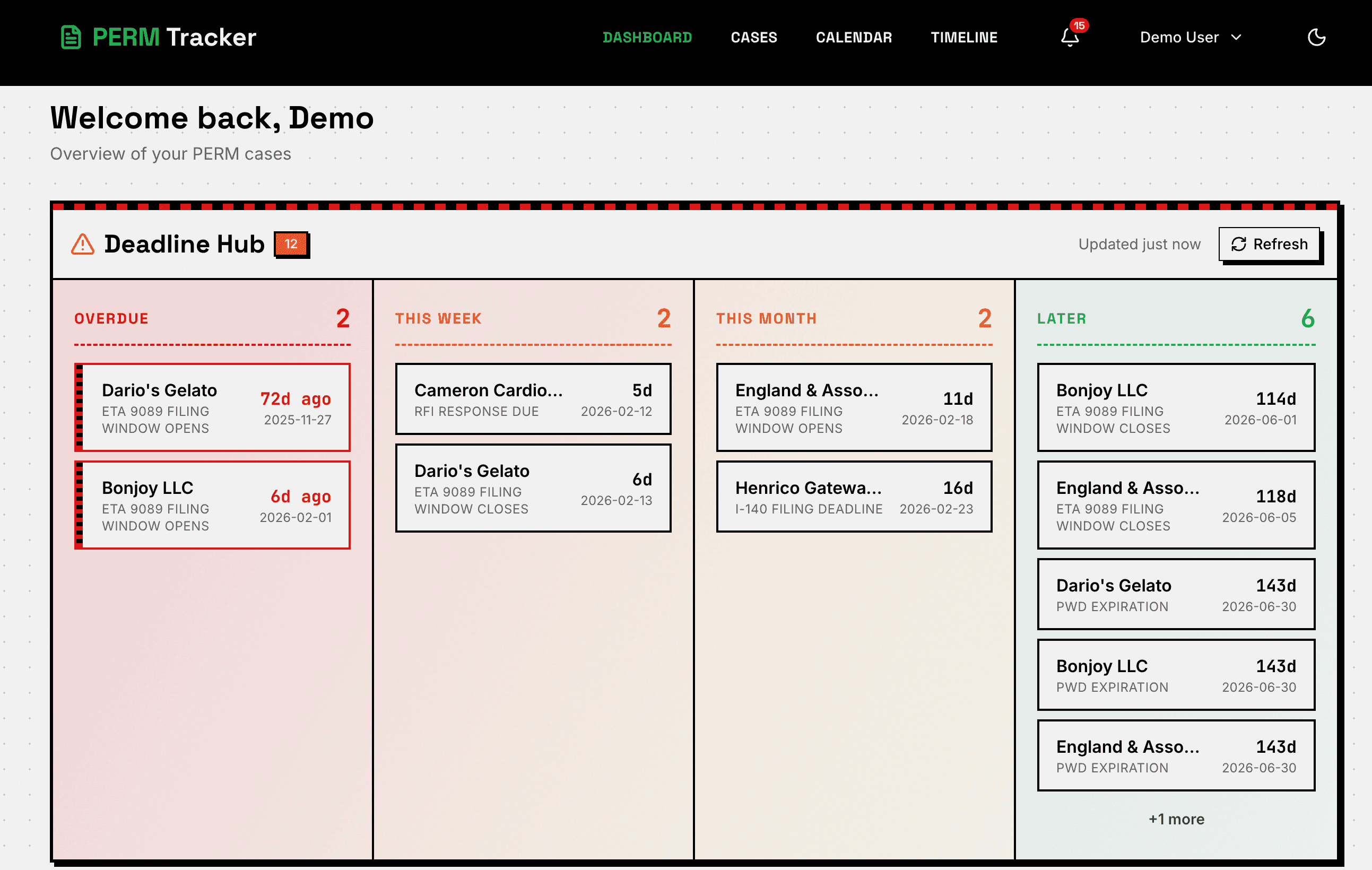
- Deadline Hub — Four urgency columns: overdue (red), this week, this month, and later. Cases move between columns automatically based on their next deadline.
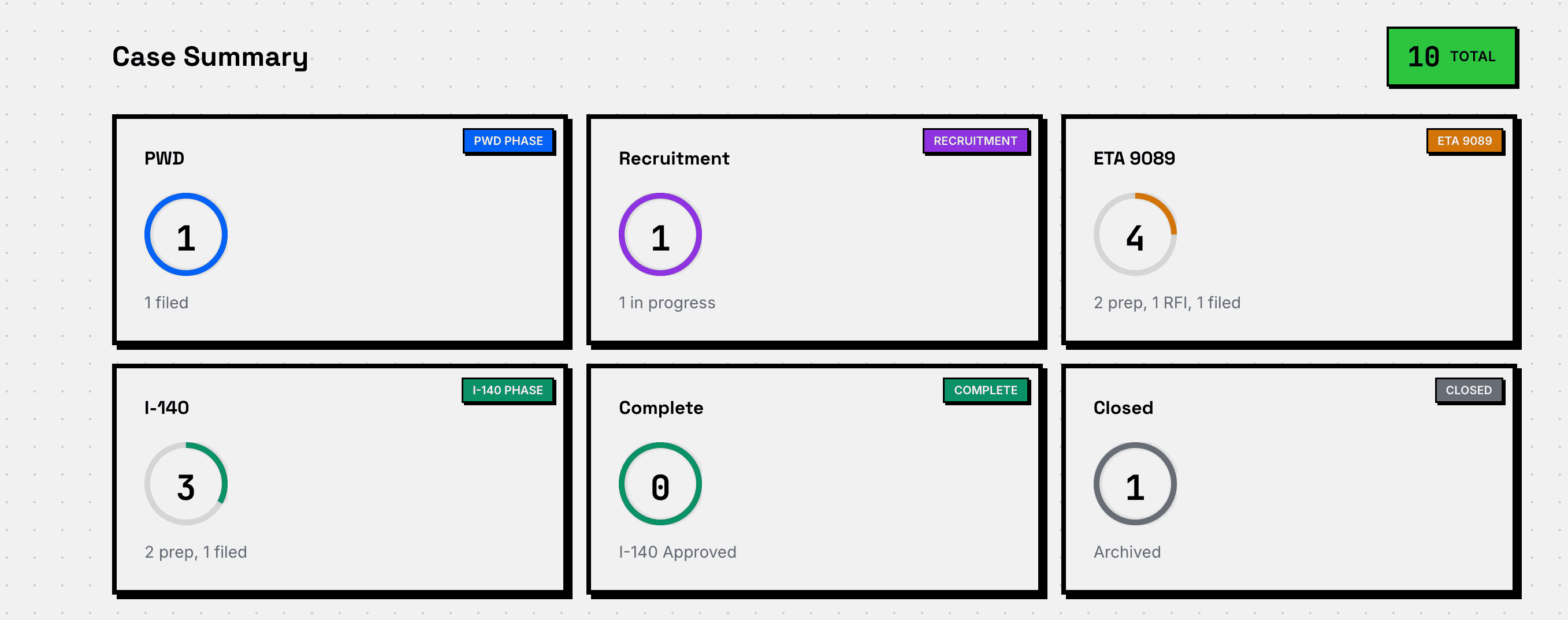
- Summary Tiles — Case counts by stage (PWD, Recruitment, ETA 9089, I-140, Complete, Closed) with interactive progress rings.
- Upcoming Deadlines — A list of the next deadlines across all your cases.
- Recent Activity — Your latest actions (case created, dates updated, status changes).
Cases — Your Caseload at a Glance
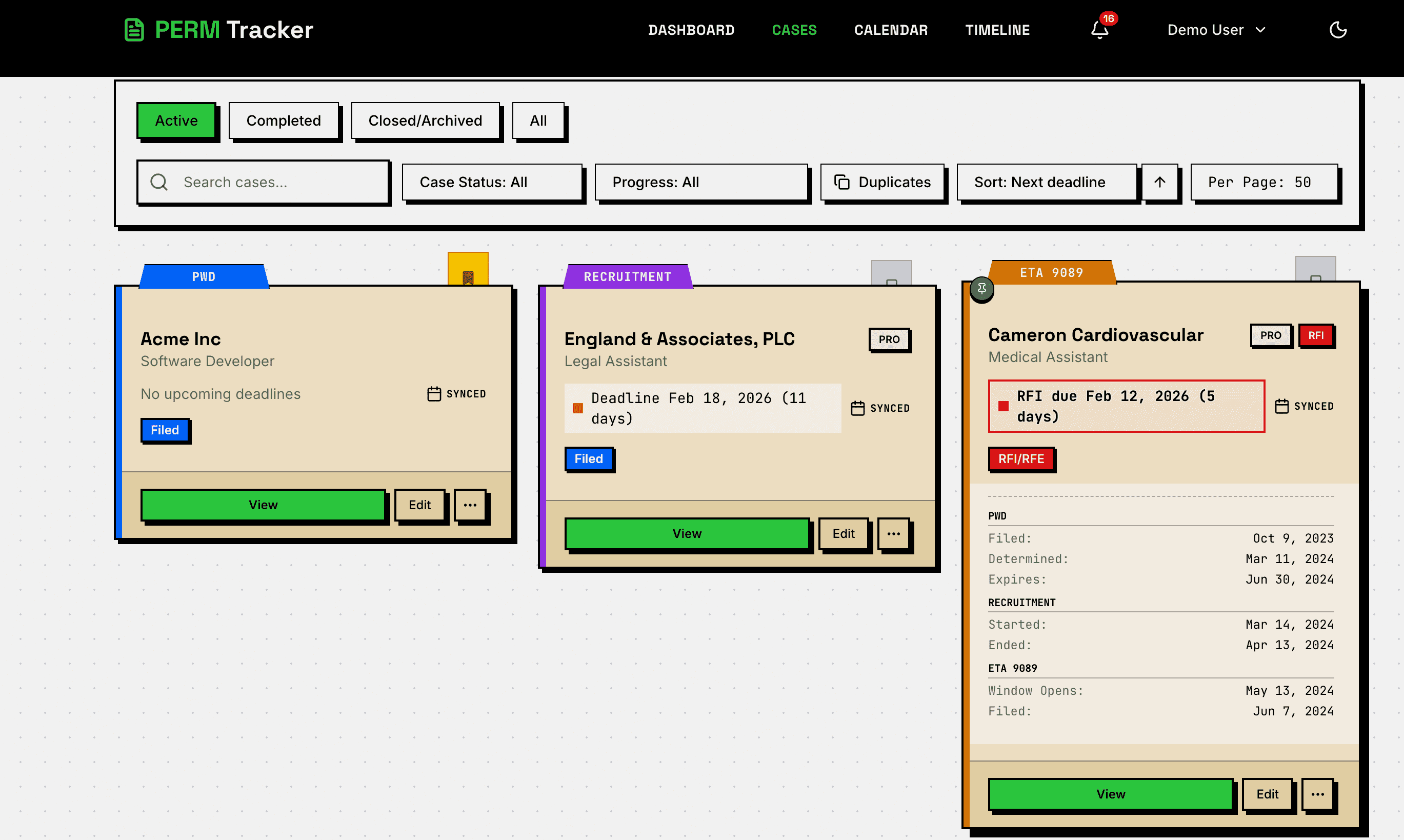
The Cases page lists all your cases with two view options:
- Card view — Each case gets a card showing employer, beneficiary, current stage, progress status, next deadline, and an urgency indicator dot.
- List view — Compact table format for large caseloads.
What You Can Do
- Search and filter — Find cases by employer, beneficiary, stage, or status.
- Sort — By deadline, name, stage, or date created.
- Expand cards — Hover or pin a card to see more details without leaving the page.
- Bulk actions — Select multiple cases to archive, delete, reopen, or export.
- Favorites — Star cases for quick access.
Creating & Editing a Case — How the Form Works
Click "New Case" from the Dashboard or Cases page. The form has two parts:
Basic Info (Always Visible)
- Beneficiary name — The foreign worker
- Company name — The sponsoring employer
- Position title — The job being sponsored
- Case status and progress — Auto-calculated from your dates (or set manually)
Progressive Sections
Below Basic Info, four collapsible sections unlock as you progress:
- PWD — Enter filing and determination dates. The expiration date auto-calculates.
- Recruitment — Enter job order dates, Sunday ad dates, notice of filing dates, and (for professional occupations) additional recruitment methods.
- ETA 9089 — Opens after recruitment is complete and the 30-day quiet period passes. Enter filing, audit, and certification dates.
- I-140 — Opens after ETA 9089 certification. Enter filing, receipt, and approval/denial dates.
💡 Save Anytime
You don't have to fill everything at once. Enter what you have, save, and come back later. The form remembers where you left off.
How Sections Work
- Checkmark — When a section is complete, it collapses and shows a green checkmark with a summary line (e.g., "Determined Jun 15 · Expires Dec 31 · $95,000 LII").
- Auto-open — When you complete a prerequisite (like entering the PWD determination date), the next section opens automatically.
- Always accessible — You can open any section at any time, even if prerequisites aren't met. A note reminds you what's needed.
- Auto-calculation — PWD expiration, filing windows, and some deadlines calculate automatically. These fields show an "auto" badge.
Validation
- Red asterisks (*) mark required fields.
- Orange warnings are advisory — they flag potential issues but don't prevent saving.
- Date constraints prevent impossible dates (e.g., certification before filing).
Case Detail View — Everything About a Case
Click any case to see its full detail view with tabs:
Overview Tab
- Next Up — The most important upcoming action for this case.
- PWD Timeline — Visual representation of the PWD determination through expiration.
- Job Description — The position details.
- Inline Timeline — A chronological view of all dates and milestones.
Recruitment Tab
- Job Order — Start/end dates and duration.
- Sunday Ads — First and second ad dates.
- Notice of Filing — Posting period dates.
- Additional Methods — For professional occupations, the 3+ additional recruitment methods with their types, dates, and descriptions.
ETA 9089 Tab
- Filing details — Filing date, case number.
- Audit status — If the case was audited.
- Certification — Certification date and expiration.
- RFI entries — Any Requests for Information from the DOL (see below).
I-140 Tab
- Filing — Filing date and receipt number.
- Outcome — Approval or denial date.
- RFE entries — Any Requests for Evidence from USCIS (see below).
Documents, Notes & Actions
- Documents — Upload, preview, and categorize case documents.
- Notes — Journal entries for internal notes.
- Actions — Edit, archive, bookmark, or sync to Google Calendar.
RFI & RFE — When the Government Asks for More
Two types of government requests can happen during a PERM case:
RFI (Request for Information) — from DOL
An RFI comes during ETA 9089 review. The DOL asks for additional documentation.
- Strict 30-day deadline — Auto-calculated from the received date.
- Track received date, due date, and submitted date.
- Shows urgency badge on case cards when approaching deadline.
⚠️ RFI Deadline
The 30-day RFI deadline is strict. Missing it means the case is denied. PERM Tracker auto-calculates this deadline the moment you enter the received date.
RFE (Request for Evidence) — from USCIS
An RFE comes during I-140 review. USCIS asks for additional evidence.
- Flexible deadline — You enter the due date (typically ~87 days from receipt).
- Track received date, due date, and submitted date.
- Shows urgency badge on case cards.
Key Difference
| RFI | RFE | |
|---|---|---|
| Stage | ETA 9089 | I-140 |
| From | DOL | USCIS |
| Deadline | 30 days (auto-calculated) | ~87 days (user-entered) |
| Consequence | Case denied | Case denied |
Professional Occupations & Additional Recruitment
For positions requiring a Bachelor's degree or higher, PERM regulations (20 CFR 656.17(e)) require 3 additional recruitment methods beyond the standard requirements.
When to Check "Professional Occupation"
Check the "Professional Occupation" toggle in the Recruitment section when the position requires a Bachelor's degree or higher in a specific field.
The 11 Available Methods
Choose from: campus placement, professional organizations, trade publications, job fairs, employer website, employee referral program, local/ethnic newspapers, radio/TV ads, career conferences, private employment firms, or other.
Method Date Types
Different methods track dates differently:
- Single-date methods (job fair, career conference) — One date field.
- Date-range methods (employer website, employee referral) — Start and end dates.
- Sub-entry methods (radio/TV ads, local newspapers) — Multiple individual entries with dates and descriptions.
Common Mistakes
- Only 2 methods — You need 3. PERM Tracker won't show recruitment as complete until 3 valid methods have dates.
- Missing dates — A method without dates doesn't count.
- Dates outside the recruitment window — Methods must occur during the recruitment period.
🚨 3 Methods Required
Professional occupations require exactly 3 (or more) additional recruitment methods, each with valid dates. Two is not enough.
Calendar & Timeline
Calendar View
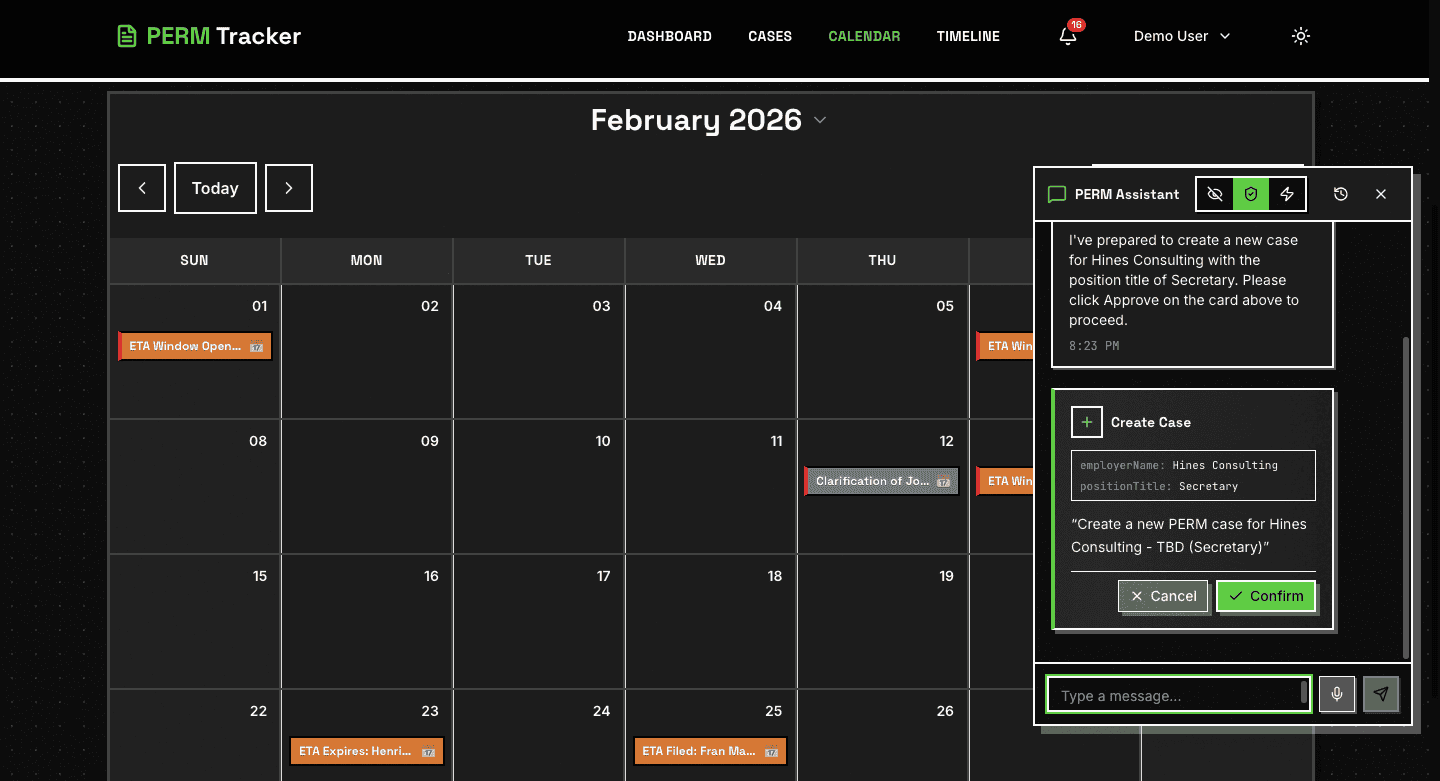
A monthly calendar grid shows all deadlines across all cases:
- Color-coded by stage (PWD, Recruitment, ETA 9089, I-140).
- Hover for deadline details (case name, deadline type, date).
- Click to navigate to the case.
Google Calendar Sync
Connect your Google account in Settings to sync deadlines:
- Go to Settings > Calendar.
- Click Connect Google Calendar.
- Enable sync per-case using the toggle in the case edit form (Notes & Settings section).
Deadlines appear as events in your Google Calendar with links back to PERM Tracker.
Timeline View
A Gantt-chart style view showing case progression across time:
- See how cases overlap and identify scheduling conflicts.
- Visual representation of recruitment windows, filing deadlines, and more.
Notifications & Alerts
PERM Tracker sends reminders through three channels:
Email Notifications
Receive deadline reminders by email. Configure:
- Which stages to receive alerts for.
- How many days before a deadline to be notified (e.g., 7 days, 3 days, 1 day).
Push Notifications
Real-time browser notifications. Enable in Settings and allow browser permissions when prompted.
Dashboard Indicators
Urgency dots on case cards and the Deadline Hub automatically highlight approaching and overdue deadlines.
Configuration
Go to Settings > Notifications to configure:
- Per-stage toggles (PWD, Recruitment, ETA 9089, I-140).
- Days before deadline for each alert level.
- Quiet hours (suppress notifications during off-hours).
Auto-Closure Alerts
Cases with expired deadlines (e.g., PWD expiration passed, filing window closed) are automatically flagged. You'll receive a notification when this happens.
AI Assistant — Your PERM Expert
PERM Tracker includes an AI assistant that can help with questions, case lookups, and actions.
What It Can Do
- Answer PERM questions — Regulations, timelines, requirements, best practices.
- Look up cases — "What's the status of the Smith case?" or "Which cases have deadlines this week?"
- Check deadlines — "When does the filing window close for case X?"
- Take actions — Update case fields, change statuses, and more (with your confirmation).
- Search the web — Look up current DOL processing times, regulation changes, and more.
Three Modes
Configure the AI behavior in Settings > AI Assistant:
- Off — Disable the AI assistant entirely.
- Confirm — The AI proposes actions but waits for your approval before executing.
- Auto — The AI executes actions automatically (use with caution).
Tips for Using the AI
- Ask natural language questions: "What are the recruitment requirements for professional occupations?"
- Reference cases by employer or beneficiary name.
- Ask "What should I do next?" for guidance on any case.
Tips, Tricks & Common Pitfalls
Best Practices
- Enter dates as you get them — Don't wait to fill everything out. Save often.
- PWD determination is the foundation — Everything else depends on it. Enter it first.
- Recruitment dates must come after PWD determination — The system enforces this.
- The 30-day quiet period is automatic — PERM Tracker calculates when the ETA 9089 filing window opens.
- Use the AI assistant for quick answers — Faster than searching through regulations.
Common Pitfalls
- Professional occupations need 3 additional methods — Not 2, not 1. Three valid methods with dates.
- RFI has a strict 30-day deadline — Enter the received date immediately so the deadline calculates.
- Filing window can be limited by PWD expiration — The window closes at either 180 days from first recruitment or PWD expiration, whichever comes first.
- Don't forget the Notice of Filing — It's a 10-business-day posting requirement that's easy to overlook.
Getting Help
- AI Assistant — Ask questions directly in the app.
- Content Hub — Browse tutorials, guides, and blog posts.
- Contact — Reach out via contact page for support.
What's Next?
Dive deeper with these resources:
- Tracking PERM Deadlines — How the automated deadline engine works
- Recruitment Tracking — Complete guide to recruitment activity management
- Complete PERM Filing Guide — Step-by-step filing instructions
- Ultimate PERM Guide 2026 — Comprehensive PERM reference
Ready to Get Started?
Create your free account and start tracking PERM cases in under a minute.
Create Free Account